> ## Documentation Index
> Fetch the complete documentation index at: https://docs.reworkd.ai/llms.txt
> Use this file to discover all available pages before exploring further.
# API Keys
Before you can use the Reworkd API, you will need to create an API key for your organization. To do this:
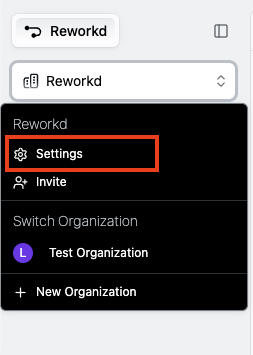
1. Travel to the organization API key page. You may either visit [https://auth.reworkd.ai/org/api\_keys/](https://auth.reworkd.ai/org/api_keys/) directly or click the settings button on the organization menu dropdown
 2. Ensure you are on the `Organization API Keys` page
3. Click the `New API key` button and create a new API key with a reasonable expiration date
You should now be able to use your new API key to authenticate your requests. To do this, you will need to add the following header to your requests:
```
Authorization: Bearer
```
2. Ensure you are on the `Organization API Keys` page
3. Click the `New API key` button and create a new API key with a reasonable expiration date
You should now be able to use your new API key to authenticate your requests. To do this, you will need to add the following header to your requests:
```
Authorization: Bearer
```